Resolve Remote Monitor

  1. Download Free remote monitor for IOS

    • Compatibility:
    • iPhone Requires iOS 16.0 or later and a device with the A12 Bionic chip or later.
    • iPadRequires iPadOS 16.0 or later and a device with the A12 Bionic chip or later.

  2. Download for Windows, Linux or Mac computer. Right now you’ll need a $300 Studio license to get the app.
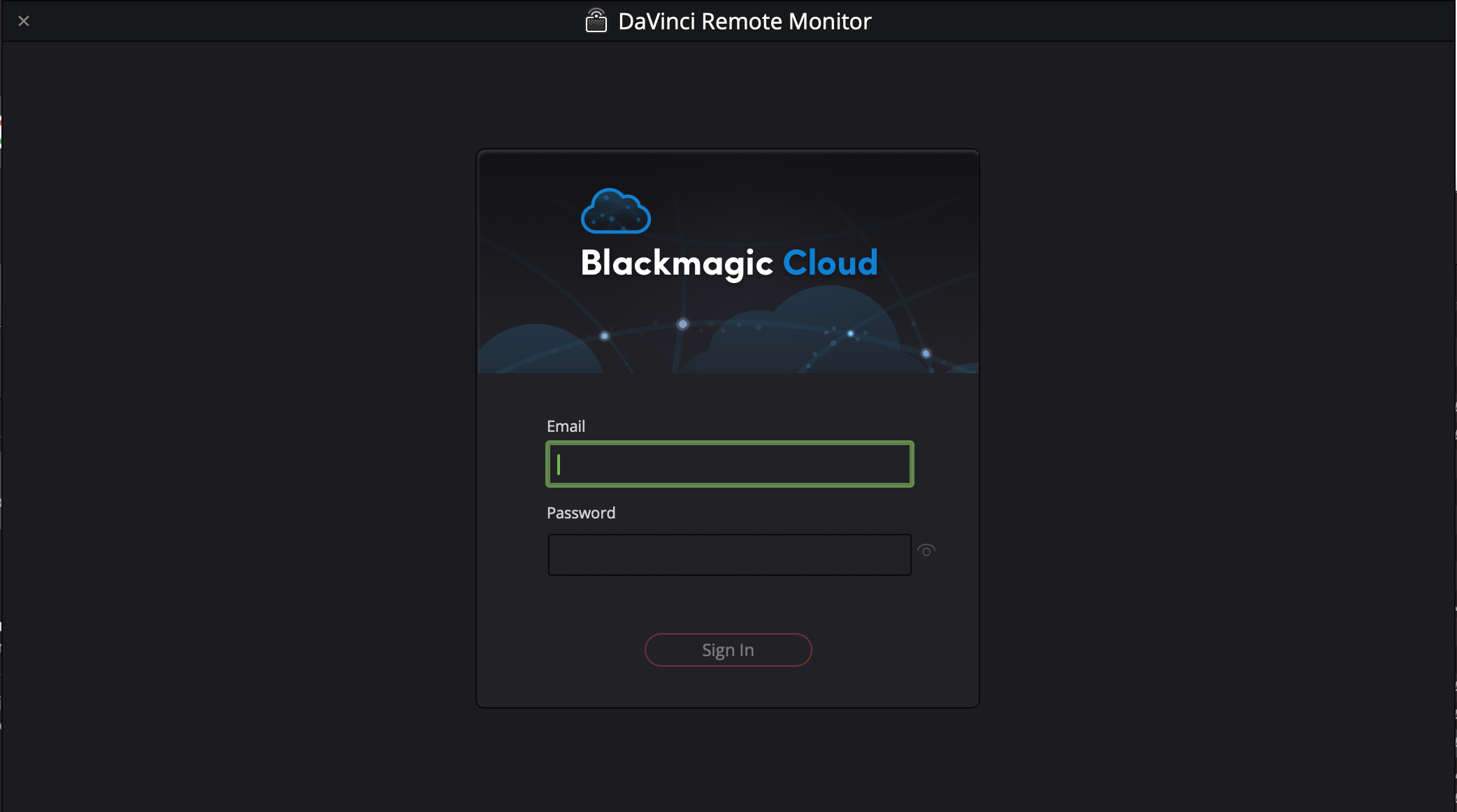
  3. Sign in with a free Blackmagic account

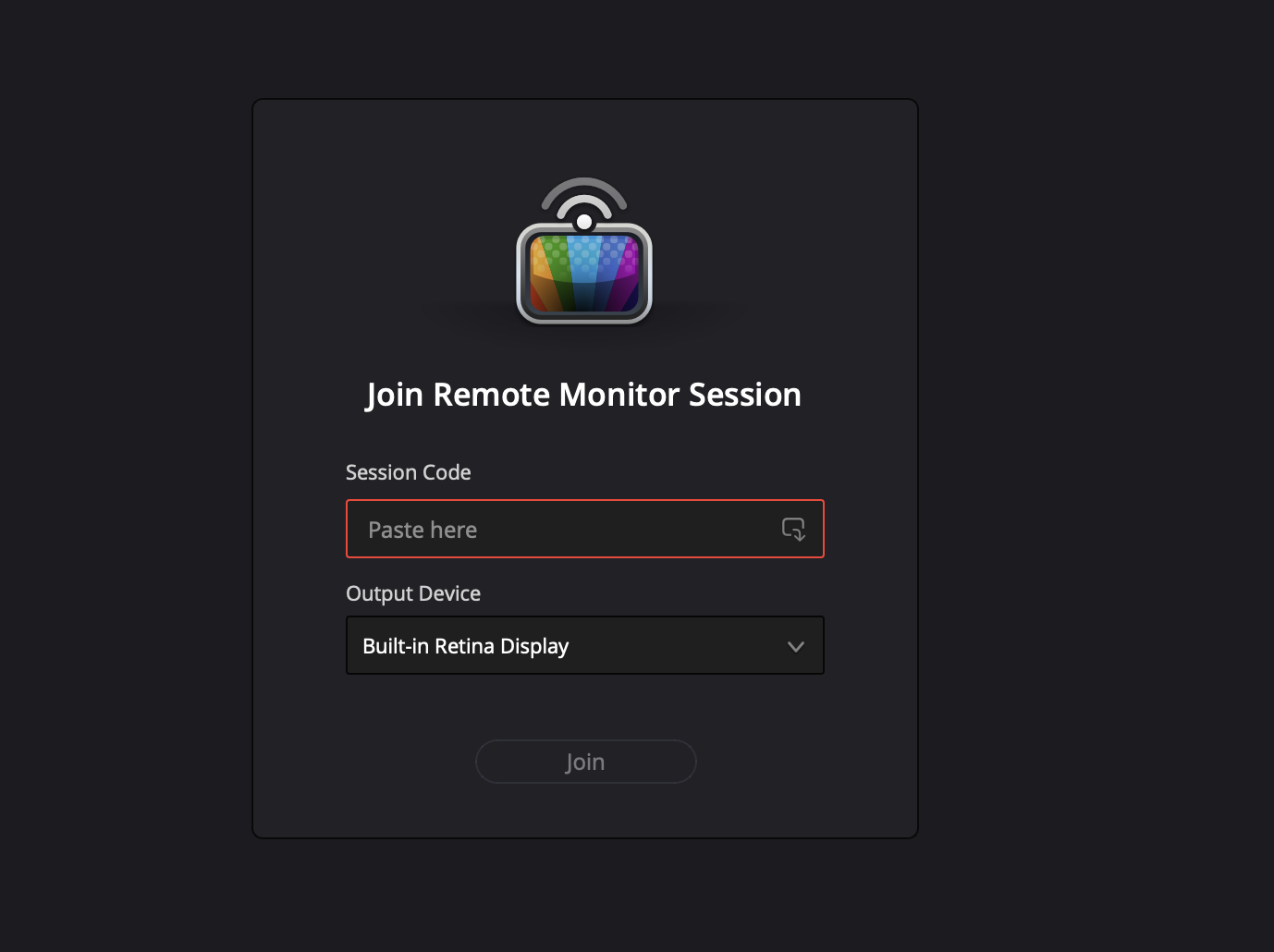
  1. Paste the session code received in email or text. You can choose an external monitor if connected.
remote monitoring

watch this tutorial


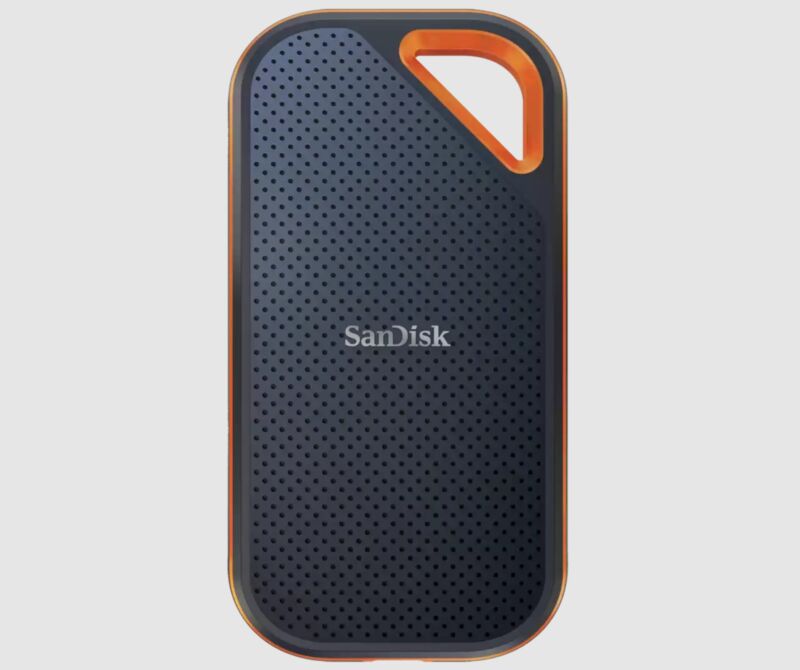
Stop using Sandisk external portable SSDs

See warnings here and here

On reddit people don’t trust Western digital/Sandisk.


Happy new ProRes 10 bit 2023!

Ever since I started editing in Premiere in 2017 I’ve been exporting ProRes wrong thinking that it’s always 10 bit.

By the way this is the must read Adobe Premiere Pro guide and it’s in there on page 121.


Save all separate images from PowerPoint.

  1. Open the Power Point presentation.pptx
  2. goto>file>Save AS
  3. Choose as destination Computer> then select a folder

4. Double click the folder.> a window opens.

5. In the window change “Save as type” to jpg

6. When you hit return this window comes up>choose All Slides.

7. Wait while the slides are exported.


Create Used Footage List From EDL Using Excel

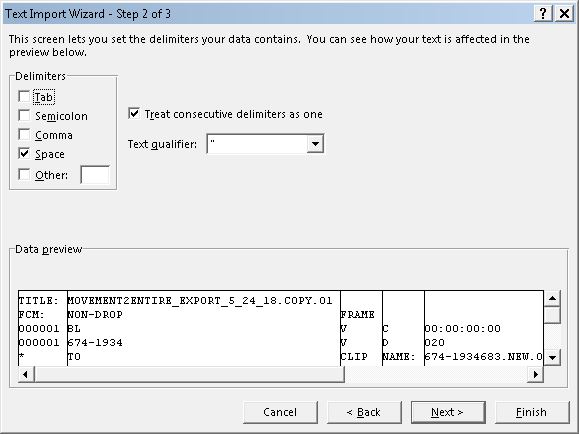
  1. File> Open > Browse to .EDL file> import wizard opens>Choose Delimited > Click Next. 
  2. Choose Space, Uncheck the Tab button. > click Next.
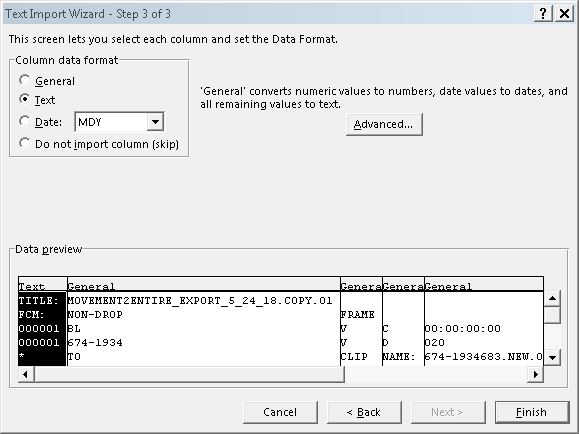
  3. Choose Text > hit Finish
  4. Save the spreadsheet as Excel workbook.
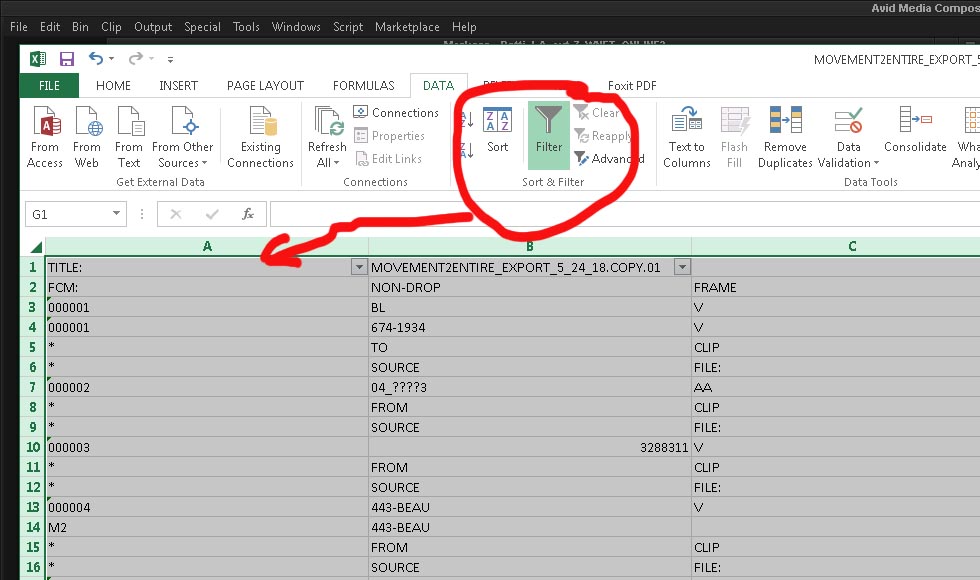
  5. Switch to the Data Tab > Top menus.
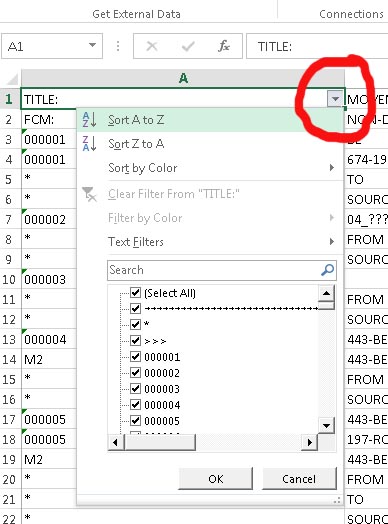
  6. Select all then click the Filter button. This makes each column a sortable category.
  7. Click the little arrow next to the column you want to sort and choose Sort A to Z in the menu that pops up.
  8. Bam your EDL is now sorted  It doesn’t really matter which column you sort, the point is to get lines that are named to same together for the next step.
  9. Select all rows that are NOT the rows you are interested in, for example: you need the SOURCE names of clips in the edl
  10. Delete all rows that are not SOURCE by selecting them and choosing delete rows (CRTL – (minus sign))
  11. Congratulations, you now have a list of clips used in the sequence without any other clutter. To neaten it up remove all duplicate rows.


AVID do’s and don’ts 2017

ICO_avidAVID do’s and don’ts 2017
In no particular order, listing recent workflow problems I found switching back to AVID this year.

DO

No. Avid’s work best with Avid media. If you want a smooth experience, you need to transcode.
I blame Avid Marketting for not making this more clear. Too many people try to AMA footage and work native and working native is NOT how Avid works.
XDCAM only imports at native resolution!!!!!!
Probably, just like with the original XDCAM, during an “import”, you cannot change the resolution.  You either need to record baseband, or Transcode after-the-fact.  Welcome to the fun world of “Tapeless Workflow”.
XDCAM and XDCAM HD follow the MXF OP1a standard, and need to be converted to MXF OP Atom. Similarly, XDCAM EX is MP4, and needs to be converted to the same.

efdfsdf

def

Resources:
Excellent How to import different formats into AVID.


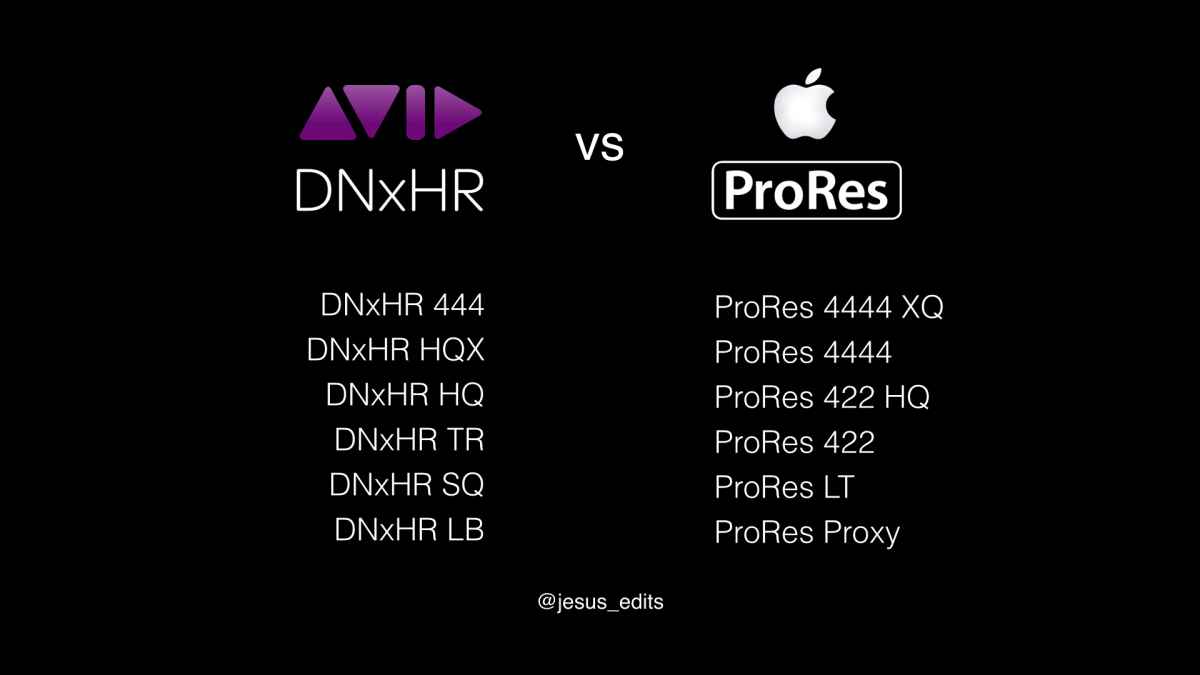
What format should I use to shoot & edit?

ProRes-4444-Logo prores DNxHDvsProRes avid_Dnxhd


Tips for getting out of password hell

The number one reason I get into password hell from time to time is because I’m juggling so many passwords and I mix them up. That said, I think it is sometimes hard to determine if my password hell is caused by human error or an error on the end of the entity I’m trying to log into. Company’s like Microsoft, Adobe & Apple juggle millions of passwords that they have to pass along between their websites, user accounts and applications. It doesn’t always work smooth, they are not honest about glitches in this system and there is not a lot of info on the web. Most web searches direct you to a page to reset your password, sometimes creating an infinite loop of resetting the password, trying to log in, resetting again etc.

Watch out, not every website lets you copy and paste a password or store passwords with browser or keychain.
Example: readkit & paypal don’t let you paste. Results will be wrong, that’s how their site is coded to prevent spammers.

Read this great times article about creating good passwords.


Apple
Apple is famous for it’s password loops, sometimes it happens on the iphone/ipad sometimes with appstore/itunes. They seem to have problems passing passwords along to the different parts of their servers. Biggest lesson I learned recently is: Reset your password on an Apple device! The browser iforgot solution is glitchy.

Problem: When changing your apple ID password in a browser you get message:
“your password contains unacceptable characters”
even though the green buttons are all lit and the password checker says “strong”
Solution : reset password on an Apple device instead.

Problem: Sometimes you unknowingly created multiple Apple ID’s because you thought you where giving an alternate email address.
Solution: pay attention to the email address Apple replies to, when you reset your password.

Problem: Even though you just successfully changed your Apple ID password, your iphone, ipad, mail application or itunes reject the password.
Solution: reset password on an Apple device.

iPhone email

Problem: Can’t send email using PoP/IMAP:A copy has been placed in your Outbox. The sender address “[email protected]” was rejected by the server.”
Solution: Fill username (your full email address) and password in on the smtp part of the email settings even though it says “optional”


WordPress (self hosted blog)

WordPress (wp-login.php) brute force attacks are common place lately.
Read this login trouble article
13 Vital Tips and Hacks to Protect Your WordPress Admin Area
In WP always try to change passwords from within the admin page.

If you’re caught in a loop, can’t get in or password new user doesn’t work then go in using phpMyAdmin. That should always work because it lets you edit the password database direct.
Make sure you edit the correct database! (I use unique email addresses for each user to make it easy to double check)

Adobe
Adobe creative cloud seems to have propagating issues similar to Apple’s.
Problem: You can log in to Application manager on one machine but not another.
Solution: Reset password on the computer that you want to work on. (and deal with the other machine later.)

Google
Google is great when it works and their servers are up, it sucks when they are down. They are not transparent about ongoing problems and because everything is free, there is nobody to yell at over the phone.


Shooting Video with the Nikon D600

When you buy a D600, you basically buy 2 camera’s in one box. You understand this when you notice that there are separate iso settings for video & stills.


pros
-great still camera
-audio with separate box to add  XLR, a little noisy, but ok for a DSLR.
-rolling shutter ok, comparable to 5Dm2
-haven’t noticed any overheating issues when shooting multiple 20 min takes.
-Nice dynamic range and low-light performance up to 1600 ASA. Grain, especially in the blacks looks bad at higher iso settings.


cons
-terrible moire & false colors etc. in almost every shot! I’m talking about 1080 24, 25 and 30 fps.

The 60fps 720p settings are even more useless. This is with sharpening turned down.
Sorry Nikon, you are still lightyears behind Canon & Sony.
The weird thing is that this full frame 24Megapixel sensor is made by Sony, the Nikon processing just screws it up. The internal H264 compression doesn’t help either and right now (Dec 2012)
you can’t use the HDMI out because it is not full screen. You can’t shoot any wide shots in focus because of the moire and watch out for anything shiny in a shot because it will be busy as hell.
-recording length limited to 20 mins.
-you can’t extend the dynamic range using a picture profile like the Technicolor profile


iTunes Match explicit/clean problem fixed.

For Mac OS X 10.6 or later!

1. Download SUBLER
2. In iTunes select the songs that are recognized as clean but you want the explicit version of.
3. Right-click and “Show in Finder”
4. Select all the songs again in the finder, or work in batches per album.
5. Drag the songs onto the Subler app to open.
6. In Subler set each song to explicit and close to save.

7. In iTunes, reset the cache.

8. Click the songs and see if they are now showing as explicit.
You might have to turn iTunes Match off/on to get it to recognize the new tags.