Shooting with the Canon C300

2.5 hr shot @ 50Mbits 1080p 29.97
Copy 60GB using USB-2 for the reader and FW-800 to the drive > 30min > 1/5 realtime

FCP-7 (with Canon XF plugin installed)
WARNING DO NOT UPGRADE TO OSX 10.8 Mountain Lion! 

Log & Transfer to Prores 422 using 2009 Core Duo macbookpro > Realtime, half realtime with i7 Quad-core
FCP-X can edit immediately (but secretly transcodes to Prores 422 when the machine is idle)

AVID (with Canon XF AMA plugin)
Can edit immediately with AMA
Transcode to DNxHD-45 > (using i7 2.7GHz) > half realtime

So:
-Transcoding in FCP or AVID seems to be half realtime with an i7 Quad-core CPU.
-Avid & FCP-X have the advantage of being able to read and edit the card immediately.
-I still have to test editing with DNxHD-45 and then relinking to the AMA files or the other way around. Don’t know what the limit is on how many hours you can link with AMA


AVID MC 6 now 100% compatible with most camera formats.

No more transcoding or re-wrapping of most current camera formats and codecs! That’s a big deal I think.
I’m cutting a show with 5D, panasonic AVC INTRA, EX1, EX3, and P2 footage.

With Final Cut I would still have to rewrap or transcode all this footage.

Sony came out with their AMA plugin in Nov 2011 and it works great.
I still transcode H264 from 5D to DNxHD 175 because of performance issues, the other formats  link and play fine.

Here is a recent discussion about the RED AMA plugin, a lot of people still prep their R3D files using RED CineX.
This is the link to the Red AMA plugin for MC6 

Sony XDCAM AMA plugins for MC6 downloads:


Using Photoshop to resize images

-100% Rule: determine what the tightest framing of a picture will be without scaling the picture above 100% in FCP or AVID.
Do this:
-open the picture in photoshop
-make the Info palette visible
-set options to Pixels

-select the Marquee tool
-eyeball different zooms on the picture using Marquee
-on the info palette read the width of your tightest framing.
-devide 1920 by that number
-in my example 1920/987=1.9
so I know I have to blow this picture up about 2x to be able to zoom in as far as I want.
-Image > Image Size
-Enter the new number for Width
-Check Scale Styles
-Constrain Proportions
-Check >Resample Bicubic
-Resolution > leave unchanged


Pulling video from web pages.

When you need YouTube video’s or any other video’s from websites for editing.
Do this: (for PC or Mac)

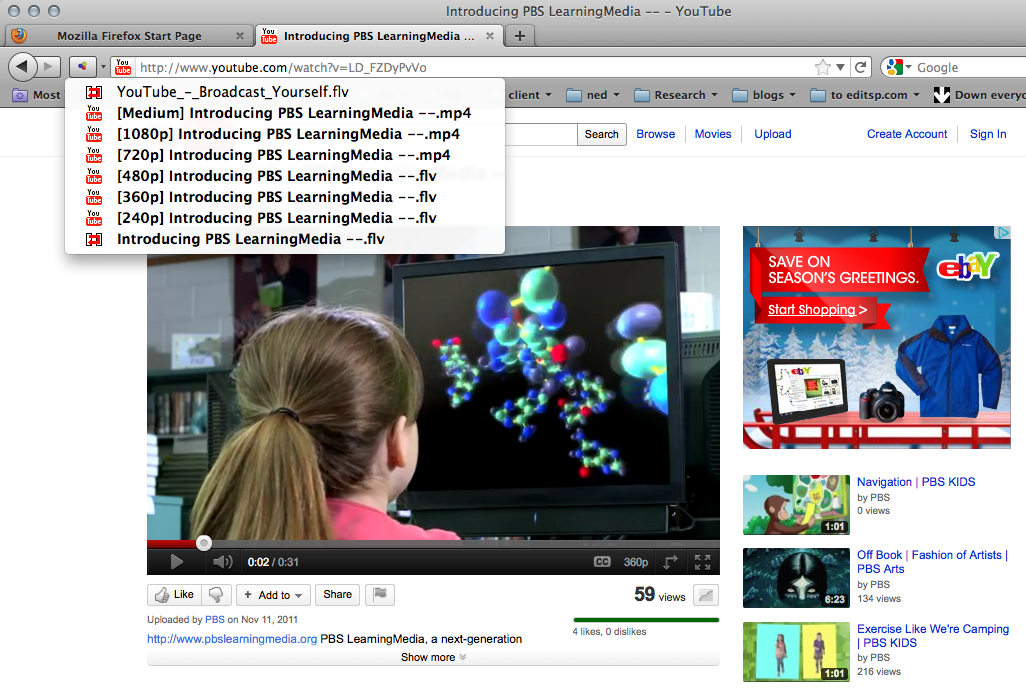
1. install the latest Firefox browser
2. install the Download helper add-on
USE this link if you google it, you will get a spammy page where the real link is hidden.
3. go to the page with the video, you’ll see the Download helper Icon, come to life.

4. click on the little down arrow to the left of the address bar.
5. choose the highest quality, biggest frame size available from the list
6. in this example the 3rd one from the top 1080p.mp4 (flv, Flash is usually worse than mp4)
7. let the file download to your computer.
8. use MPEG Streamclip on one of the FCP systems to transcode to DVCPROHD.
Sometimes this plug-in can’t pull the video > use Screenflow instead.